Implementation Showcase (Demo Data)
SynQ Workforce Management for Small Service Businesses: Implementation Showcase
A transparent SynQ Workforce showcase connecting employee onboarding, availability, rosters, attendance, timesheets and payroll handoff for a small service business.
Australia · Canberra implementation · 13 October 2026
This is a Synergy Labs implementation showcase using illustrative demo data. It is not a client performance report, payroll product or industrial-relations compliance claim.
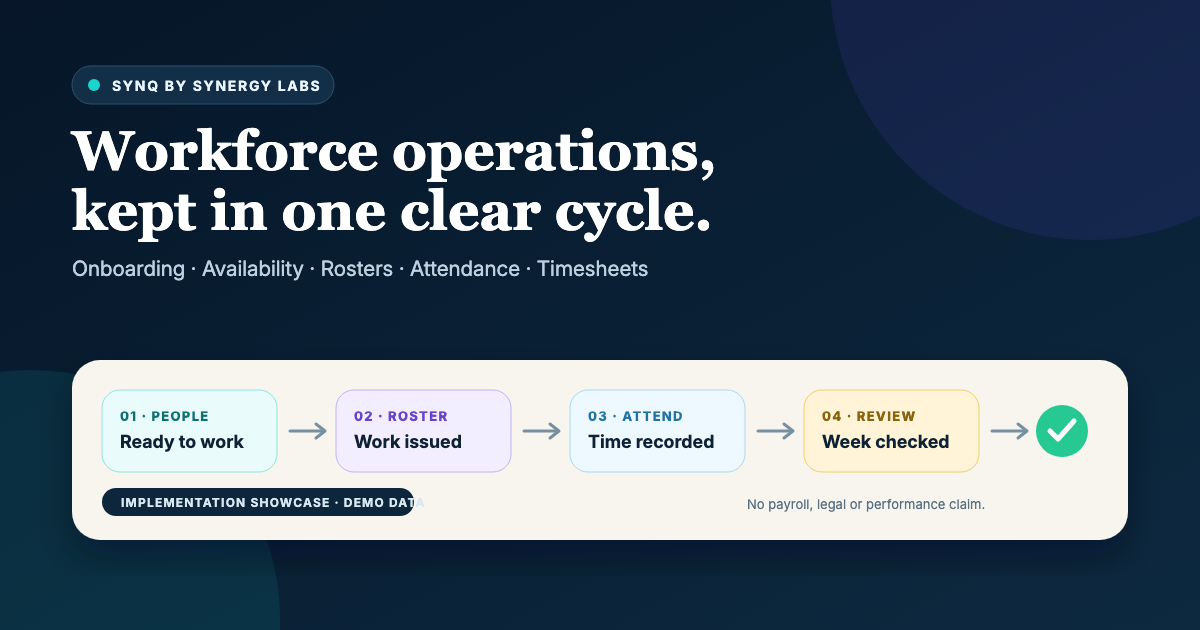
A service business can win the enquiry, send the quote and confirm the booking, yet still lose control when the work reaches the team. Employee details may sit in email. Availability arrives through messages. The roster lives in a spreadsheet. Clock times are written somewhere else, and the weekly timesheet becomes a reconstruction exercise.
This SynQ Workforce implementation showcase was created to test a more connected operating model for a small Australian service business. It follows the work from employee onboarding and availability through roster publication, attendance, timesheet review and payroll handoff preparation.
Transparency note: the names, shifts, locations and records shown in this showcase are illustrative demo data. This is not a client performance report. No labour saving, revenue increase, payroll accuracy or compliance result is claimed.
Showcase type: SynQ Workforce + Operations
Best fit: Small service businesses with employees or regular shift-based teams
Location: Australia, with implementation led from Canberra
Focus: Onboarding, availability, rosters, attendance, timesheets and payroll handoff
The operational gap after a customer says yes
Customer management and workforce management are often purchased as separate ideas. In practice, a booked job and the people delivering it belong to one operational story. A booking creates a requirement for labour, location, timing and responsibility. The roster communicates the plan. Attendance records what happened. A timesheet summarises work for review. The approved result then moves to the organisation's configured payroll process.
When those stages are disconnected, the manager has to carry context manually. A change in the booking may not reach the roster. A worker may see a shift but not the update that affected it. A clock record may appear without the scheduled range that explains the intended work. A timesheet can show a total without making the underlying attendance easy to inspect.
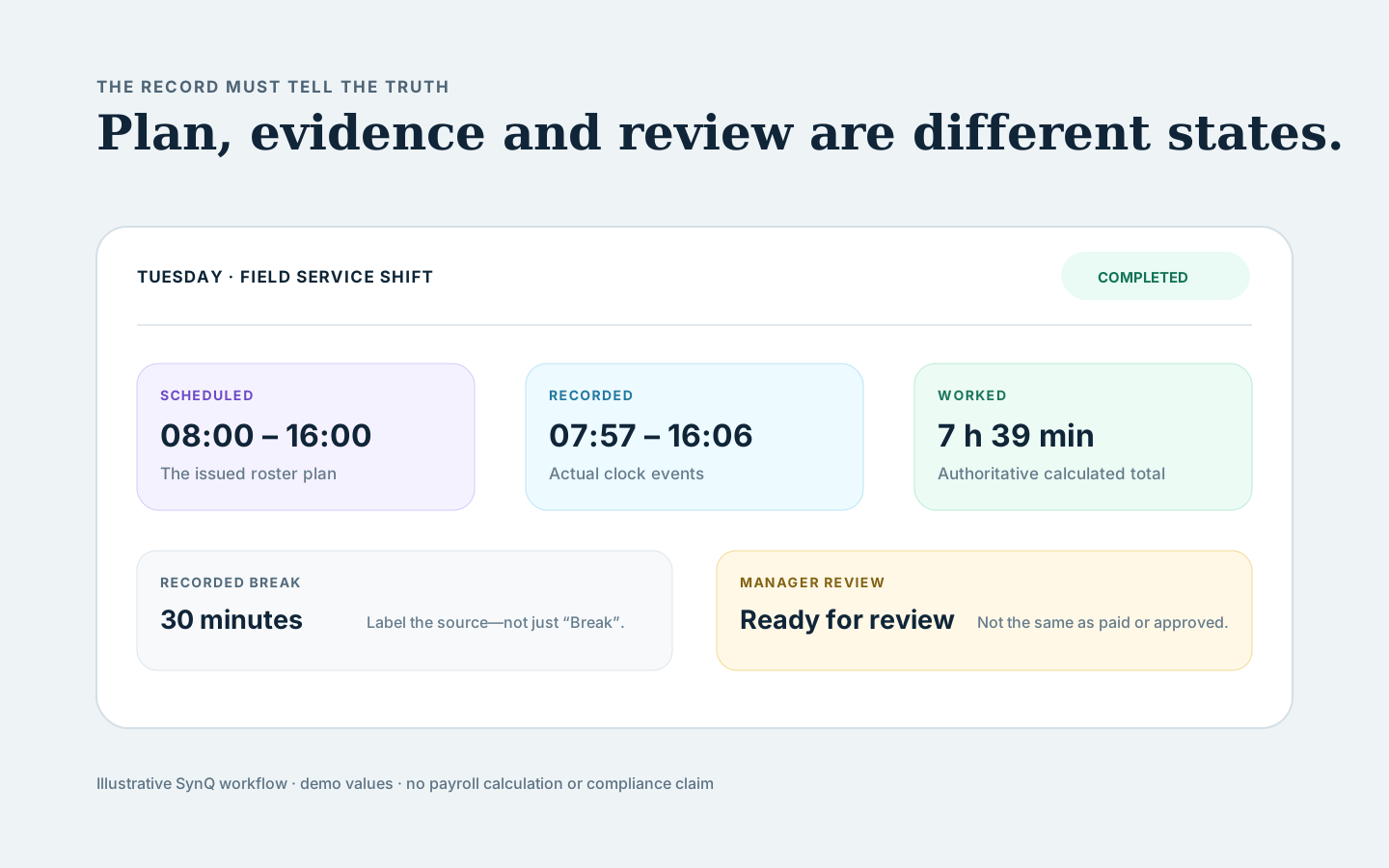
The problem is not simply that there are too many screens. It is that the meaning changes at each stage. Scheduled time is a plan. Recorded time is evidence of attendance. Worked time is a calculated operational total. A draft timesheet is not the same state as an attendance record awaiting review. The system must keep those distinctions visible instead of flattening them into one ambiguous number.
The implementation question
We framed the showcase around one practical question: can a small service business see the complete workforce cycle without turning SynQ into a payroll engine or hiding important decisions behind automation?
The answer required more than placing employee names beside a calendar. The workflow needed separate manager and worker responsibilities, deliberate acknowledgement points, traceable corrections and clear boundaries around what the software does not decide.
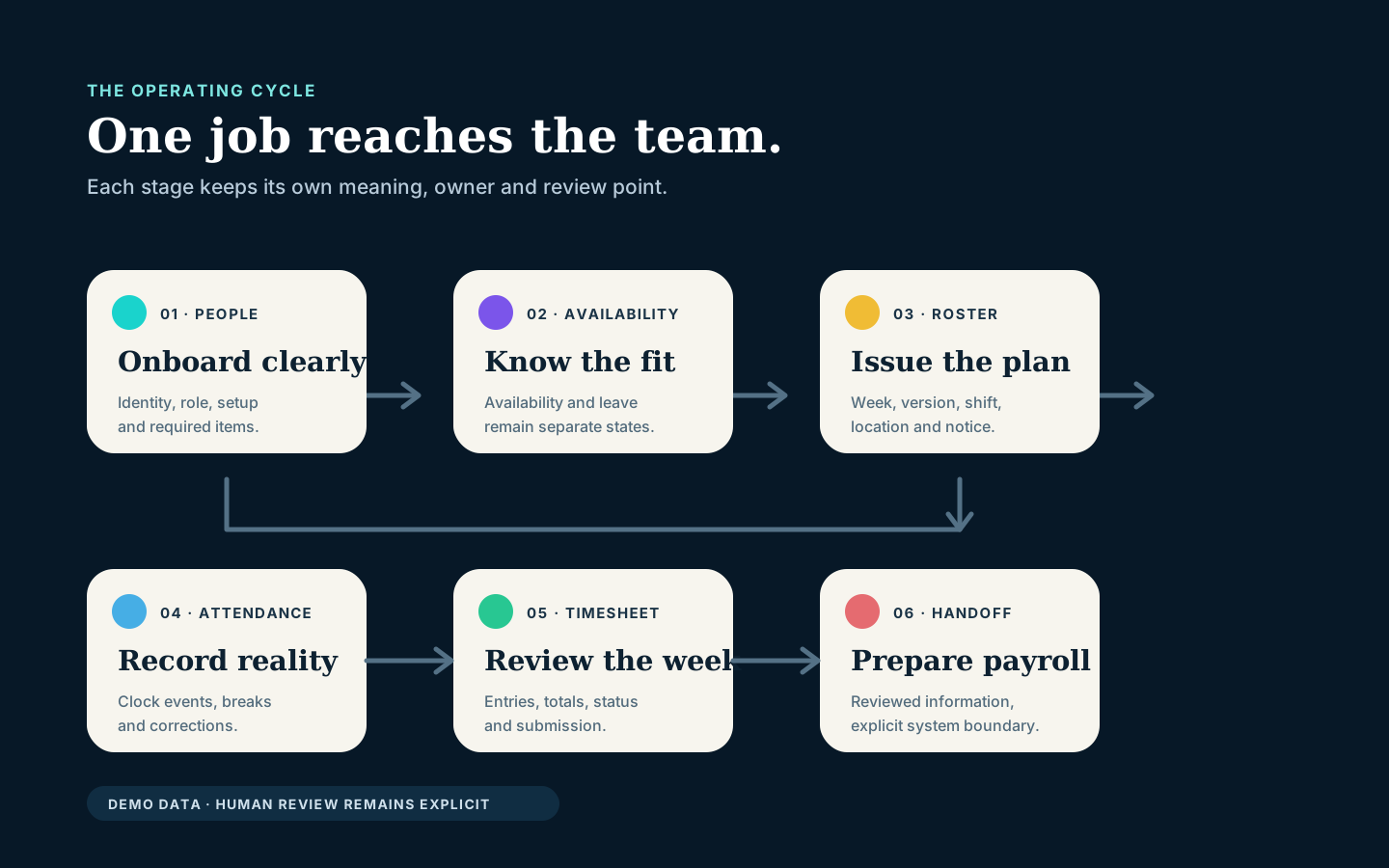
Synergy Labs therefore designed the showcase around six connected stages:
- People and onboarding: establish the worker, role, engagement context and required setup information.
- Availability and leave: collect when a person can work and which requests still need a decision.
- Roster planning and publication: turn service demand into scheduled work and issue an identifiable roster version.
- Attendance: record clock-in, breaks and clock-out against the issued work.
- Timesheet review: show recorded time, corrections and the status of the weekly summary.
- Payroll handoff: prepare reviewed information for the configured payroll process without pretending SynQ interprets every award or calculates payroll universally.
What we configured in SynQ Workforce
1. A structured people and onboarding record
The first stage gives the business a controlled place for worker identity, role and the onboarding items relevant to the configured rollout. The purpose is not to collect every possible document. It is to make required information visible, show what remains incomplete and give the manager and worker an understandable next step.
A good onboarding workflow needs restraint. Sensitive workforce information should not be duplicated across ordinary notes and chat threads. Access needs to follow role and operational need. The showcase therefore treats the employee record as a protected source and avoids copying details into later screens unless the task requires them.
2. Availability kept separate from the roster
Availability describes when a worker can be considered for work. A roster describes work the business has planned and issued. Mixing those states creates avoidable confusion, especially when a request changes after a draft roster has been prepared.
In the showcase, workers have a clear availability and leave destination, while managers retain the decision-making context needed for planning. The interface does not present an availability preference as a confirmed shift, and it does not treat a leave request as approved merely because it was submitted.
3. Roster publication as a versioned event
The roster stage turns operational demand into assigned work. Each meaningful publication or update needs enough identity to be reviewed later: the relevant week, version, worker, location and change. A worker can see the issued shift and, where necessary, a notice that the roster changed.
Acknowledging an update records that it was seen. It does not mean the worker agreed to a separate consultation outcome, and opening the notice does not silently acknowledge it. That distinction matters because a convenient interface should not manufacture a decision.
4. Scheduled and recorded time shown honestly
The worker view makes the plan and the attendance record legible without forcing them into one line. Scheduled time shows the rostered start and finish. Recorded time shows actual clock events where available. Worked time remains the authoritative calculated duration produced by the configured attendance logic, with breaks labelled according to whether they are planned or recorded.
This prevents a common interpretation error. A person may be rostered from 8:00 am to 4:00 pm but record slightly different clock times. The worked total should not be casually recalculated from rounded display values, and recorded attendance should never be overwritten with the roster duration simply because the numbers look close.
5. Attendance corrections remain reviewable
Clock events can be incomplete or disputed. The showcase keeps a correction request attached to the relevant attendance record rather than asking the worker to explain the issue in a detached message. Routine clock-event history can stay behind a labelled disclosure, while unresolved exceptions remain visible.
The event trail records what occurred and when. It does not repeat the same session duration beneath every clock event or imply that individual events are separate blocks of worked time. The session summary carries the duration; the trail carries event type, timestamp and correction history.
6. A weekly timesheet with a controlled submission step
The timesheet brings the week's attendance records into one review surface. The selected week, previous and next navigation, recorded total, record summary and entry states are visible without oversized controls pushing the work below the fold.
Submission remains an explicit action. The worker sees the acknowledgement that applies before submitting, and the system follows the existing eligibility rules. It does not auto-submit, invent hours, disable a valid zero-hour scenario without authority or enable a timesheet that fails the configured checks.
Why the manager and worker experiences are different
The manager needs coverage, exceptions, publishing and review. The worker needs today's work, clear roster information, reliable clocking and an understandable route to corrections and timesheets. Giving both roles the same dense dashboard would make neither experience better.
The worker home in this showcase is therefore a concise overview. My Work is the detailed workspace with Today, Shifts and Timesheets. Availability and work settings remain reachable but visually secondary. The manager side retains the broader workforce tools required to plan and review.
This role distinction also protects information. A worker should not gain access to manager-only modules merely because both users participate in the same workflow. The implementation keeps navigation and permissions tied to real role and route state.
How the workflow was tested
The showcase used isolated demo fixtures rather than live employee records. We reviewed mobile widths from 320 to 430 CSS pixels, short screens, enlarged text and desktop. The test states included active work, breaks, completed attendance, overnight ranges, draft and submitted timesheets, corrections, roster updates, long names and locations, and empty or failed data states.
We also checked the account sheet because navigation and workforce actions share the same mobile shell. The sheet had to sit above fixed bottom navigation, prevent background interaction, restore focus and keep the final Sign out action reachable without changing sign-out behaviour.
These checks demonstrate interface and workflow behaviour. They do not prove an organisation's payroll configuration, award interpretation or legal compliance. Those depend on the employer's circumstances, applicable instruments, policies, data and professional advice.
What the workflow deliberately does not automate
A connected platform becomes less trustworthy when it hides judgement behind a convenient status change. The showcase therefore keeps several decisions deliberately human-controlled. A submitted leave request is not an approval. Opening a roster notice is not acknowledgement. Clocking out is not confirmation that a roster update was reviewed. A completed attendance session is not automatically an approved weekly timesheet, and a submitted timesheet is not proof that payroll has processed it.
The same restraint applies to corrections. A worker can explain that a clock event is missing or wrong, but the request does not rewrite the original event silently. The manager can review the reason, compare it with the roster and attendance trail, then follow the organisation's authorised process. This preserves the difference between an observation, a request and an accepted change.
Automation still has useful work to do. It can surface incomplete onboarding, identify unpublished shifts, remind the right person that a record needs review and prepare consistent information for the next step. Those actions reduce chasing without inventing a decision. The system should be able to explain why a task appeared, which record it belongs to and what authority is required to resolve it.
This boundary is particularly important for a small team. When one owner or manager wears several roles, the interface must help that person change responsibility consciously rather than treating every action as interchangeable. Clear states are not extra administration; they are what make the operating history understandable later.
The result of the showcase
The completed demonstration makes one operating cycle visible: a person is onboarded, communicates availability, receives scheduled work, records attendance, reviews the weekly timesheet and hands approved information toward payroll. Each stage retains its own meaning and status.
- Employee and onboarding information has a defined home.
- Availability, leave and scheduled work remain distinct.
- Roster updates can be identified and acknowledged deliberately.
- Scheduled and recorded time are labelled accurately.
- Attendance corrections attach to the relevant record.
- Timesheet status and submission remain explicit.
- Worker and manager views reflect different responsibilities.
- The payroll handoff boundary is visible rather than overstated.
The outcome is not a promise that every service business should replace its current stack. Some organisations need specialised award interpretation, payroll, HR, field-service or compliance systems. The useful decision is whether the handoffs between those systems are clear, testable and appropriate for the team's real work.
What a real rollout would require
A production implementation begins with process mapping. Synergy Labs would confirm employment types, locations, roster rules, attendance method, breaks, correction ownership, approval roles, payroll destination, access boundaries, retention needs and the modules included in scope.
The rollout would then use controlled sample data, acceptance scenarios and role-based testing before real employee records are introduced. Managers and workers need a short handover that explains not only which buttons to press, but what each status means and where responsibility changes.
Finally, the business needs a review rhythm. Exceptions, correction volume, late submissions, roster changes and failed handoffs can reveal where the operating process still needs improvement. Software makes these signals visible; management decides what to change.
The key lesson
Workforce management is not one calendar and one total. It is a chain of decisions connecting people, planned work, actual attendance, review and pay preparation. The system becomes easier to trust when each state is explicit and the user can see who owns the next action.
That is the purpose of SynQ Workforce: connect daily delivery to the wider customer and operational journey without hiding important human decisions.
Explore a SynQ Workforce rollout
If your service business is coordinating onboarding, availability, rosters, attendance and timesheets across messages, spreadsheets and separate tools, Synergy Labs can map the first useful workflow and show where SynQ fits.
Explore SynQ Workforce or request a workforce workflow review.