Implementation Showcase (Demo Data)
AI Front Desk for Canberra Trades: Implementation Showcase
A transparent walkthrough of how Synergy Labs can connect call and website enquiry capture, qualification, CRM handoff and follow-up for a Canberra trade business.
Canberra / ACT · 9 September 2026
This is a Synergy Labs implementation showcase, not a client performance report. Interface screens use illustrative demo data and no revenue, booking or conversion uplift is claimed.
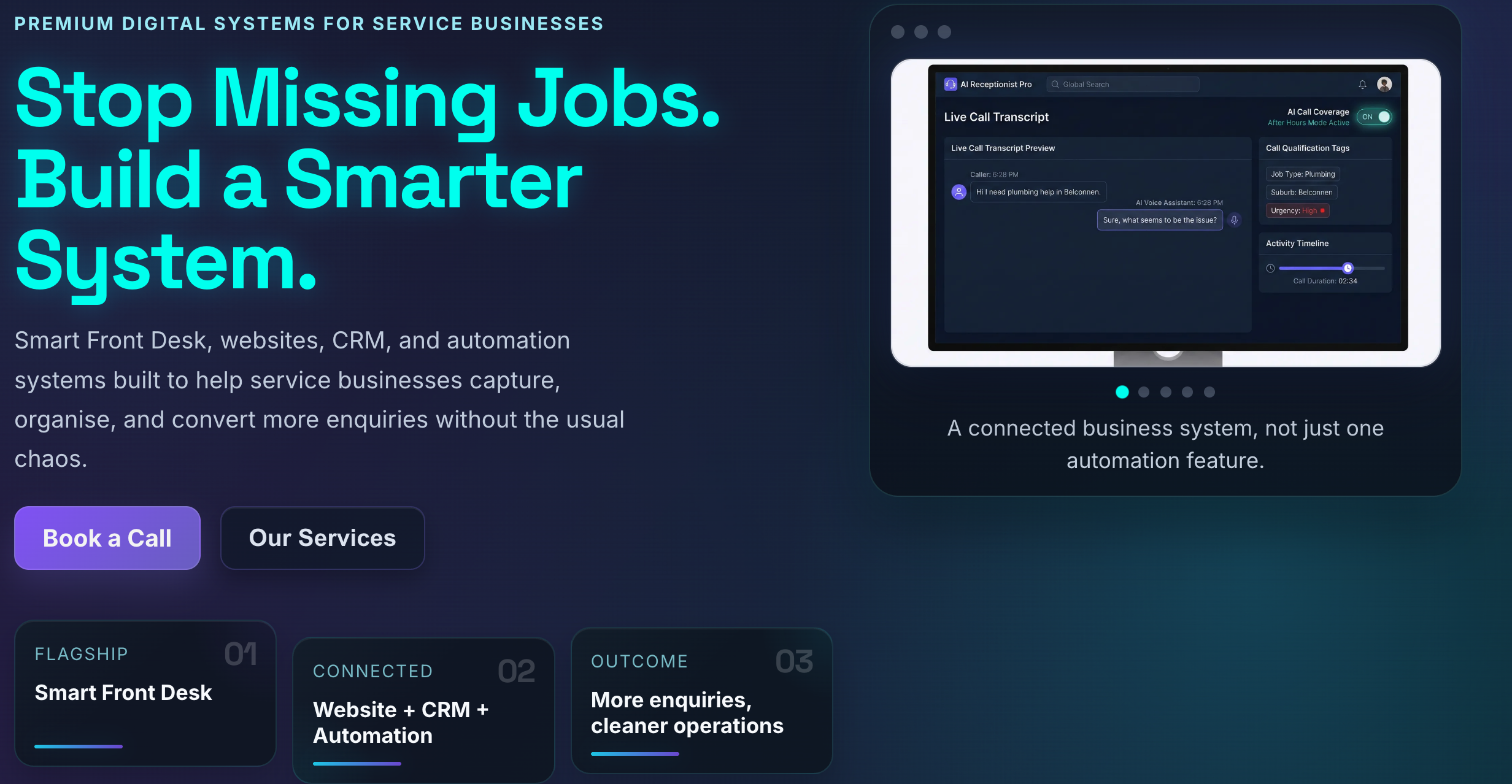
When a plumber, electrician, HVAC technician or builder is driving, working on site or speaking with an existing customer, a new caller can easily reach voicemail. The problem is not that the team does not care. The problem is that the enquiry arrives at a moment when nobody is free to capture the details and decide what should happen next.
This Synergy Labs implementation showcase maps a practical alternative: an AI front desk that can receive an approved type of enquiry, collect the information the business actually needs, create a structured CRM record and hand the lead to a person with a clear next action.
Important: this page demonstrates a system design using illustrative demo data. It is not presented as a completed client rollout and does not claim invented lead, revenue, booking or conversion results.
Showcase type: AI Front Desk + CRM + Automation
Location: Canberra / ACT
Best fit: Plumbers, electricians, HVAC teams, builders and other appointment-based service businesses
Focus: Missed-call capture, qualification, CRM handoff and human follow-up
The Scenario
A customer calls after hours with a blocked drain, power issue or failed air conditioner. Another customer submits a website form while the team is moving between jobs. A third leaves a vague voicemail that says only, “Please call me back.” Each one could be valuable, but every extra delay makes the conversation harder to recover.
A traditional voicemail records audio but does not reliably create structured work. Someone still has to listen, write down the contact details, understand the request, judge urgency and remember to call back. The same fragmentation can happen when website forms, social messages and calls all live in separate places.
The design goal was therefore not “use AI everywhere.” It was to create one controlled path from first contact to accountable human action.
The Workflow We Designed
The showcase follows a five-stage workflow:
- Capture: receive a supported phone or website enquiry when the team cannot answer immediately.
- Qualify: ask a short, business-approved set of questions about the service, suburb, urgency and preferred contact time.
- Record: create or update the lead in the CRM instead of leaving the context inside a separate transcript or inbox.
- Route: alert the correct person and surface urgent or out-of-scope requests for human review.
- Follow up: create a task, send an approved acknowledgement and keep the next action visible until it is completed.

1. Capture Without Pretending Every Call Is the Same
An emergency plumbing call, a routine maintenance request and a supplier call should not enter the same flow. The front desk first needs boundaries: which enquiries it can handle, which questions it can ask and which situations must be escalated immediately.
For a trade business, the approved capture fields might include the caller's name, phone number, suburb, broad job type, urgency, access constraints and preferred callback window. The system should collect only what is necessary for the next step.
If the caller describes danger, medical risk, fire, gas, live electrical hazards or another emergency outside the business's agreed process, the assistant should not improvise technical advice. It should use the approved escalation language and move the interaction to the correct human or emergency pathway.
2. Turn Conversation Into Useful CRM Context
A transcript can be useful for review, but a wall of text is not a workflow. The important output is a structured lead record that a busy owner can scan quickly.
The CRM handoff can include:
- customer name and verified callback details;
- service category and Canberra suburb;
- stated urgency and any escalation flag;
- a concise conversation summary;
- the source of the enquiry;
- the person responsible for the next action; and
- a due time for the callback or quote follow-up.
This makes the handoff usable. The owner does not have to reconstruct the customer's story from voicemail, notes and several inboxes before making contact.
3. Automate the Repetitive Step, Keep the Decision Human
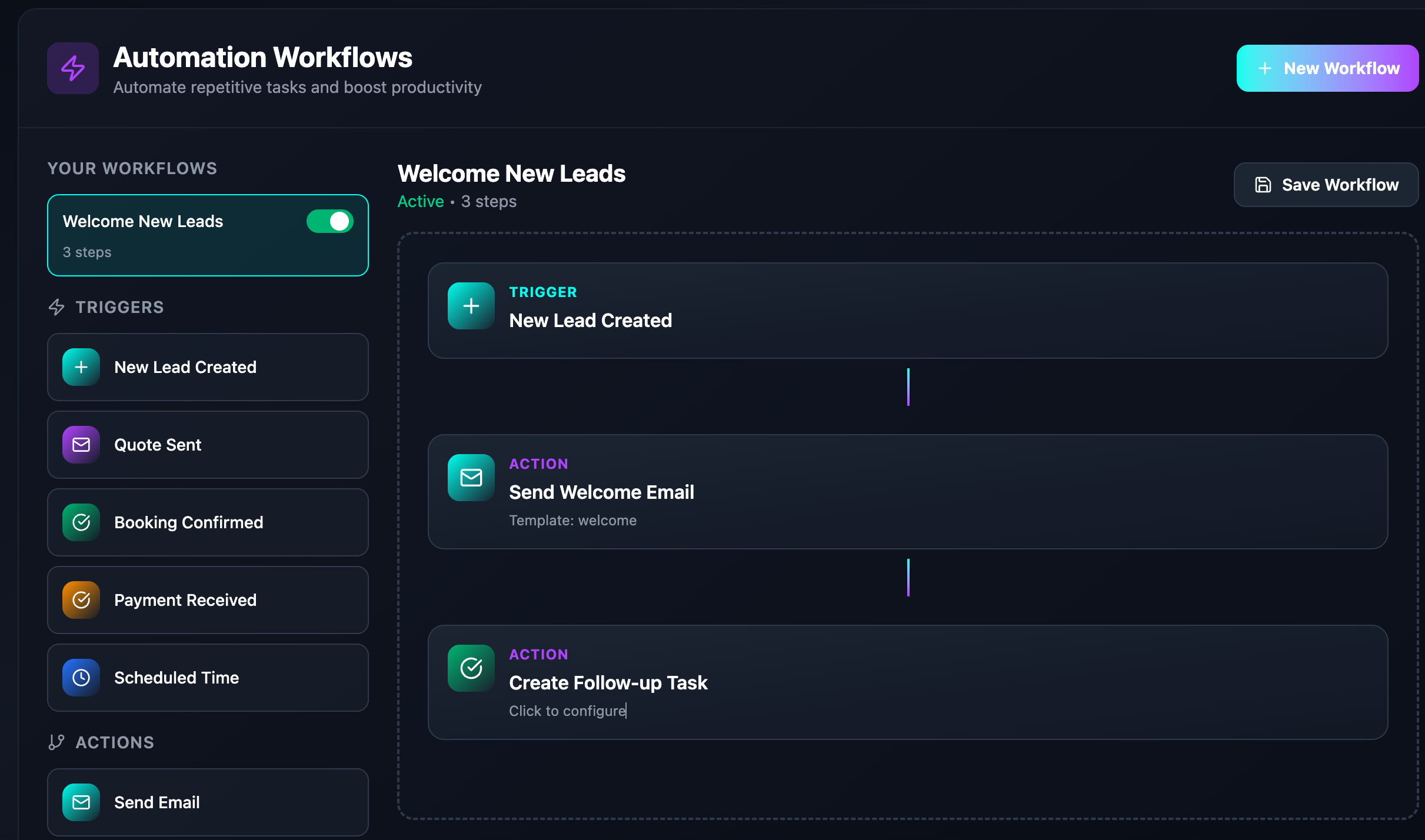
The safest and most useful automation is usually narrow. A new lead can trigger an acknowledgement, create a follow-up task and notify the right person. The human still decides whether to quote, book, decline or escalate the work.
The example workflow below starts when a new lead is created. It sends an approved welcome message and creates a follow-up task. In a live implementation, the wording, timing, staff assignment and stop conditions would be configured around the business rather than copied from a generic template.
4. Make Ownership and Exceptions Visible
Automation fails when nobody knows who owns the exception. Every captured enquiry should have a visible status and next step. A practical pipeline might use stages such as New, Reviewing, Contacted, Quoting, Booked and Closed, with a reason recorded when work is declined.
The system should also make failures visible. If an acknowledgement cannot be delivered, a required field is missing or an integration stops working, the team needs an alert rather than silent confidence that the automation completed.
What This System Can and Cannot Do
It can support:
- after-hours or overflow enquiry capture;
- consistent, approved qualification questions;
- structured CRM records from calls and forms;
- instant internal notifications;
- acknowledgement messages; and
- follow-up tasks with clear ownership.
It should not be positioned as:
- a replacement for emergency services or professional safety advice;
- permission to make promises about availability or pricing that the business has not approved;
- a substitute for human review of unusual, sensitive or high-risk enquiries; or
- proof of commercial results before real baseline and post-launch data exist.
How We Would Measure a Real Rollout
Before launch, Synergy Labs would document the existing process and establish a baseline. After launch, the business could compare the same measures over a meaningful period. Useful measurements include:
- percentage of calls answered or captured;
- median time from enquiry to first human response;
- percentage of captured enquiries with complete contact and job details;
- number of follow-up tasks completed on time;
- enquiry-to-quote and quote-to-booking rates; and
- staff time spent listening to voicemail and re-entering information.
Those numbers would become valid case-study results only after the system was deployed, the measurement window was agreed and the client approved publication.
Who This Approach Fits
This design is most useful for a service business with meaningful inbound enquiries, a defined service area and a team that can act on captured leads. It is especially relevant when technicians spend much of the day away from a desk or when valuable calls arrive outside normal office hours.
It may not be the right first investment for a business with very low enquiry volume, no consistent service process or nobody available to complete the human follow-up. In those cases, the first step may be fixing the website, offer or basic lead-management discipline.
Implementation Principles
- Start narrow: launch with a defined call type or overflow window.
- Use approved language: document what the assistant may say and what it must escalate.
- Collect less: capture only the information needed for the next business action.
- Keep a human owner: every lead and exception needs a responsible person.
- Test real scenarios: include unclear requests, urgent situations and integration failures.
- Measure honestly: compare post-launch results with a documented baseline.
The Takeaway
An AI front desk is valuable when it improves the handoff between customer intent and human service. The phone conversation, website form, CRM record and follow-up task should behave like one connected system—not four separate tools.
This showcase demonstrates the architecture and operating principles. A real deployment would be tailored to the business's services, escalation rules, staff availability, privacy requirements and existing software.
Want This Workflow Mapped for Your Trade Business?
Synergy Labs builds practical AI front desk systems, CRM setups and business automation for Canberra service teams.
Book a free strategy call and we will map the first-contact and follow-up workflow before recommending technology.