Synergy Labs Blog
Small Business Workflow Automation: What to Automate First
A practical Australian guide to choosing, designing and testing small business workflow automation without creating more admin or fragile systems.
22/10/2026
Small business workflow automation should remove chasing, re-keying and forgotten follow-ups. It should not create a second job called “looking after the automation”.
That distinction matters. Plenty of businesses buy software before they have agreed on how the work should move. The result is a faster version of the same confusion: duplicate customer records, notifications nobody owns and a workflow that works beautifully until a customer does something unexpected.
The better approach is less dramatic. Pick one repeated workflow. Make the handoffs clear. Automate the stable steps. Keep judgement with the right person. Then test what happens when something goes wrong.
This guide explains how to do that for an Australian small business without turning the project into an enterprise transformation program.
What is small business workflow automation?
Workflow automation uses software to move a piece of work from one defined step to the next. A workflow normally contains:
- A trigger: something happens, such as a website enquiry arriving.
- A rule: the system checks what should happen next.
- An action: it creates a record, assigns an owner, sends a message or updates another system.
- An exception path: if the information is incomplete or an action fails, the right person is told what needs attention.
For a service business, that might look like this:
New enquiry → customer record → owner assigned → acknowledgement sent → follow-up due → quote created → accepted quote becomes booked work
The point is not to automate every conversation. It is to make sure the conversation leads to visible work with an owner and a next action.
That is also why workflow automation is different from simply adding another app. A new app can store information. A useful workflow connects the information, decision and next step.
Why start with the workflow, not the software?
Small teams often run on memory. One person knows which inbox to check, which spreadsheet is current and which customer needs a call back. That can work while the volume is low. It becomes fragile when the team grows, somebody takes leave or two jobs change at once.
Australian businesses do not all begin from the same digital baseline. The Australian Bureau of Statistics’ experimental Digital Intensity Index found that, in 2021–22, only 5% of businesses with zero to four employees were in the “Established” category, compared with 53% of businesses employing 200 or more people. The measure is historical and experimental, but the gap is useful context: small businesses usually have less time and fewer specialist resources to absorb a complicated rollout.
That makes order important. If you choose the platform first, every problem starts to look like a feature you should turn on. If you map the workflow first, you can ask the more useful question: what is the smallest reliable change that removes a real bottleneck?
What should a small business automate first?
Start with a workflow that is frequent, rule-based and painful when missed. Good first candidates often include:
- Enquiry capture and follow-up
- Booking confirmations and reminders
- Quote acceptance and job creation
- Collection of job notes, photos or completion details
- Invoice preparation and payment reminders
- Staff onboarding checklists
- Routine weekly reporting
Do not choose a workflow just because it is annoying. Score it against five questions:
| Question | A strong first workflow |
|---|---|
| How often does it happen? | Daily or several times each week |
| Are the steps stable? | The usual path is understood |
| What happens when it is missed? | A lead, deadline or payment is at risk |
| Can success be measured? | Response time, completion rate or rework can be compared |
| Can a person still intervene? | Exceptions can pause and be reviewed safely |
A task that happens once a quarter may be irritating but is unlikely to be the best first automation. A task that happens every day, follows a clear pattern and regularly creates chasing is a better candidate.
A practical seven-step method
1. Name the outcome in plain English
“We need automation” is not an outcome. “Every website enquiry should have an owner and a due follow-up within five minutes” is.
Choose one result and one measure. Examples include:
- Time from enquiry to first response
- Percentage of accepted quotes that become scheduled work
- Number of jobs missing completion notes
- Time between job completion and invoice preparation
- Number of overdue follow-ups
Avoid promising a saving before you have a baseline. Measure the current process for a short, representative period first.
2. Map the real process
Write down what actually happens, not what the procedure says should happen.
For each step, record:
- The person or system that starts it
- The information required
- The current owner
- The next action and due time
- The system where the record lives
- Common exceptions
This usually exposes the problem before any automation is built. The issue may not be data entry. It may be that nobody owns the next step, or that three systems each claim to be the source of truth.
3. Standardise the handoff
You do not need to script every customer interaction. You do need a consistent handoff between stages.
At every handoff, answer three questions:
- Who owns the work now?
- What exactly happens next?
- When should it happen?
If those answers are missing, automation will move uncertainty faster. If they are clear, even a simple reminder can be useful.
4. Separate rules from judgement
Automate predictable administration. Keep material decisions with a person.
A system can create a draft, check that required fields are present and route it for review. It should not silently make a judgement that your team would normally inspect, especially where money, customer commitments, safety or sensitive information are involved.
A practical pattern is:
System prepares → person reviews → system records the approved action
This is slower than fully automatic execution by a few seconds. It is much easier to trust, explain and correct.
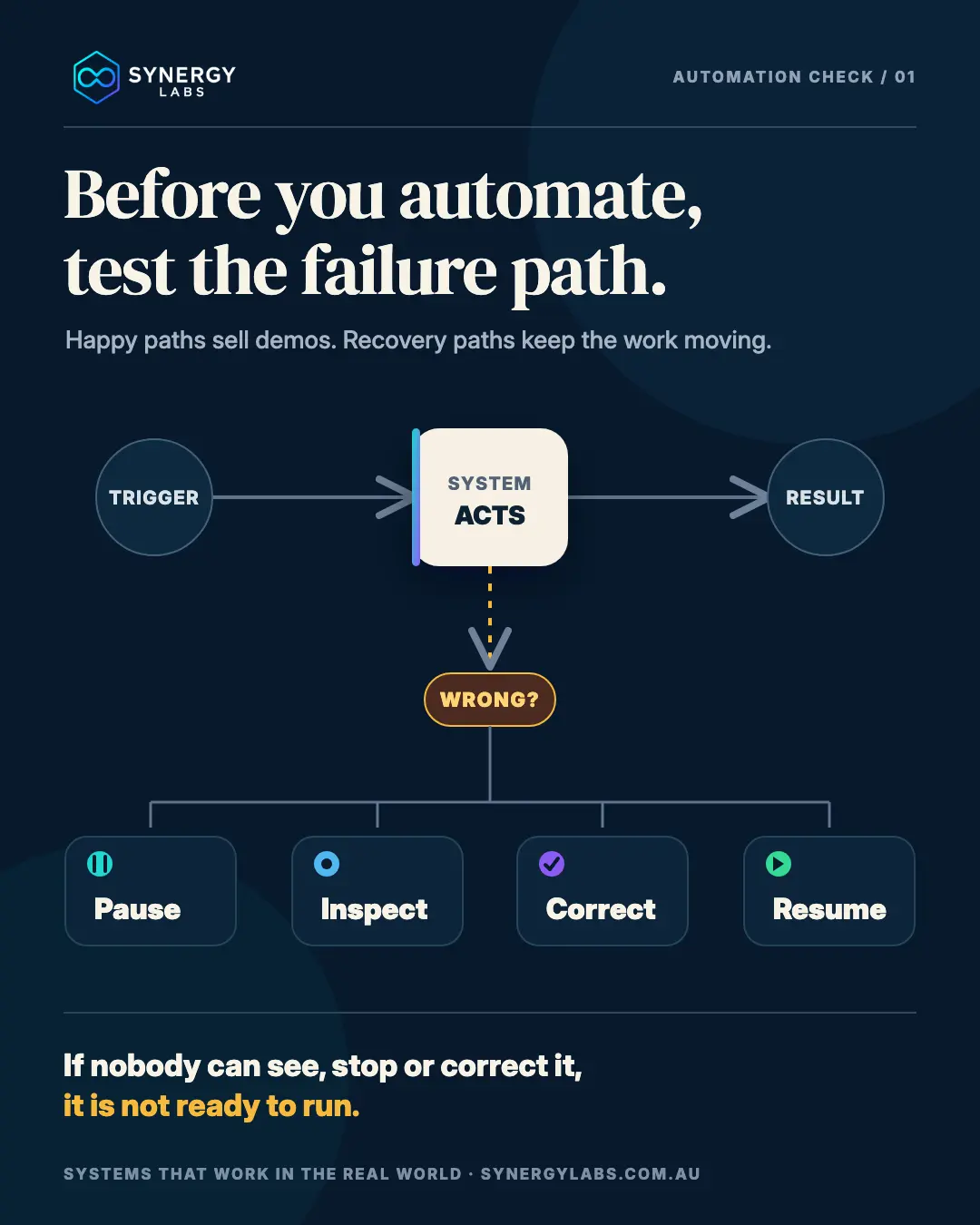
5. Design the failure path before launch
Most workflow diagrams show the happy path. Real businesses need the other half of the diagram.
For every automated step, ask:
- What if the customer record already exists?
- What if a required field is missing?
- What if the connected service is unavailable?
- What if the wrong person is assigned?
- What if the action runs twice?
- What if somebody needs to reverse it?
A reliable workflow should be able to pause, show what happened, let an authorised person correct it and resume without rebuilding the entire job. It also needs a visible history so the team can distinguish “nothing happened” from “something failed”.
That is the difference between a demo that looks clever and a system people can use on a busy Monday.
6. Protect access and information
Automation often connects customer records, email, calendars, files and financial systems. Treat those connections as part of the design, not a technical detail to revisit later.
The Australian Cyber Security Centre’s current small-business guidance recommends practical controls including multi-factor authentication, software updates, tested backups and staff awareness. It also recommends restricting and monitoring access. In workflow terms, that means each user and integration should have only the permissions required for its job.
The Office of the Australian Information Commissioner describes privacy by design as incorporating privacy into planning and system design from the start. A simple application is to collect only the information the workflow genuinely needs, document where it moves and avoid retaining unnecessary copies.
This is general operational guidance, not legal advice. If the workflow handles sensitive information or regulated records, get advice relevant to your industry and obligations.
7. Run it beside the current process, then review
Do not switch off the old process the moment the first test succeeds.
Run the new workflow in a controlled period using confirmed test records. Compare the result with the current method. Check:
- Did every trigger create the expected record?
- Were duplicates prevented?
- Did the right person receive the exception?
- Could the action be corrected or reversed?
- Did timestamps and time zones behave correctly?
- Did the history show who or what changed the record?
- Did the customer receive the right message once, not twice?
Then review the original measure. If response time improved but staff now spend longer repairing records, the workflow is not finished.
Worked example: enquiry to booked job
Imagine a small property-services business receiving enquiries from its website, phone and social channels.
Before
Website enquiries arrive by email. Phone enquiries are written in a notebook. Social messages stay in the platform inbox. The owner copies promising leads into a spreadsheet and asks a team member to follow up. Nobody can see, at a glance, whether every enquiry received a response.
First reliable version
- Each enquiry creates or updates one customer record.
- The source and original message are retained.
- The system assigns an owner using a simple rule.
- An acknowledgement is sent only when valid contact details are present.
- A follow-up action receives a due time.
- Missing information or a possible duplicate pauses for review.
- Quote acceptance creates the next work stage, but the booking is confirmed by the responsible person.
- Every change is recorded against the same job journey.
Notice what is not automated: the quality of the conversation, the final scope and any decision that depends on site conditions. The workflow removes the avoidable admin around those decisions.
What to measure
Compare a defined period before and after launch:
- Median first-response time
- Enquiries without an owner after 15 minutes
- Follow-ups completed by their due time
- Duplicate records created
- Accepted quotes waiting for booking
- Exceptions requiring manual repair
The goal is not “more automation”. The goal is a more reliable customer journey and less hidden work.
Common mistakes to avoid
Automating a process that changes every week
If the team has not agreed on the normal path, keep the process visible and manual while it stabilises.
Connecting every system at once
Each connection adds another failure point, permission set and data copy. Start with the minimum number of systems needed to complete one useful workflow.
Measuring activity instead of the outcome
The number of automated actions is not a business result. Measure response, completion, delay, rework or another consequence that matters.
Hiding exceptions
A silent failure is worse than a manual task. Put exceptions in a queue with an owner, reason and next action.
Removing the human review that made the process safe
Automation should not erase judgement. Use approvals where a mistake would create a customer, financial, privacy or operational consequence.
A simple 30-day rollout
Week 1: Observe. Choose one workflow, record the baseline and map the real steps and exceptions.
Week 2: Design. Set the owner, next action and due time at every handoff. Decide which steps are automated, which require approval and where the source of truth lives.
Week 3: Build and test. Use confirmed test records. Test the happy path, duplicates, missing data, service failure, correction and reversal.
Week 4: Run and review. Operate beside the current process, compare the measures and fix the failure path before expanding the scope.
Only then move to the next workflow.
Frequently asked questions
Is workflow automation only for larger businesses?
No. A small team can benefit from one reliable workflow without buying an enterprise platform. The scope should match the team’s capacity to maintain and review it.
Do we need AI to automate a workflow?
Usually not. Rules, forms, reminders and integrations can handle many repeated tasks. AI can help with unstructured information, but it adds uncertainty and should be used where its output can be checked.
How much of a process should be automated?
Automate the stable, repetitive steps first. Leave exceptions and material decisions with a person until the rules and evidence justify more automation.
How do we know whether an automation is working?
Compare a small set of before-and-after measures and monitor exceptions. A workflow is useful when the outcome improves without creating hidden repair work or unacceptable risk.
Start with one handoff
You do not need a map of the whole business to begin. Pick one repeated handoff that creates chasing, delay or re-keying. Give it one owner, one next action and one due time. Then automate only the part you can make visible, testable and recoverable.
If you want help mapping that workflow and deciding what should stay human, Synergy Labs can turn the current process into a practical automation plan—without starting with a shopping list of software.